
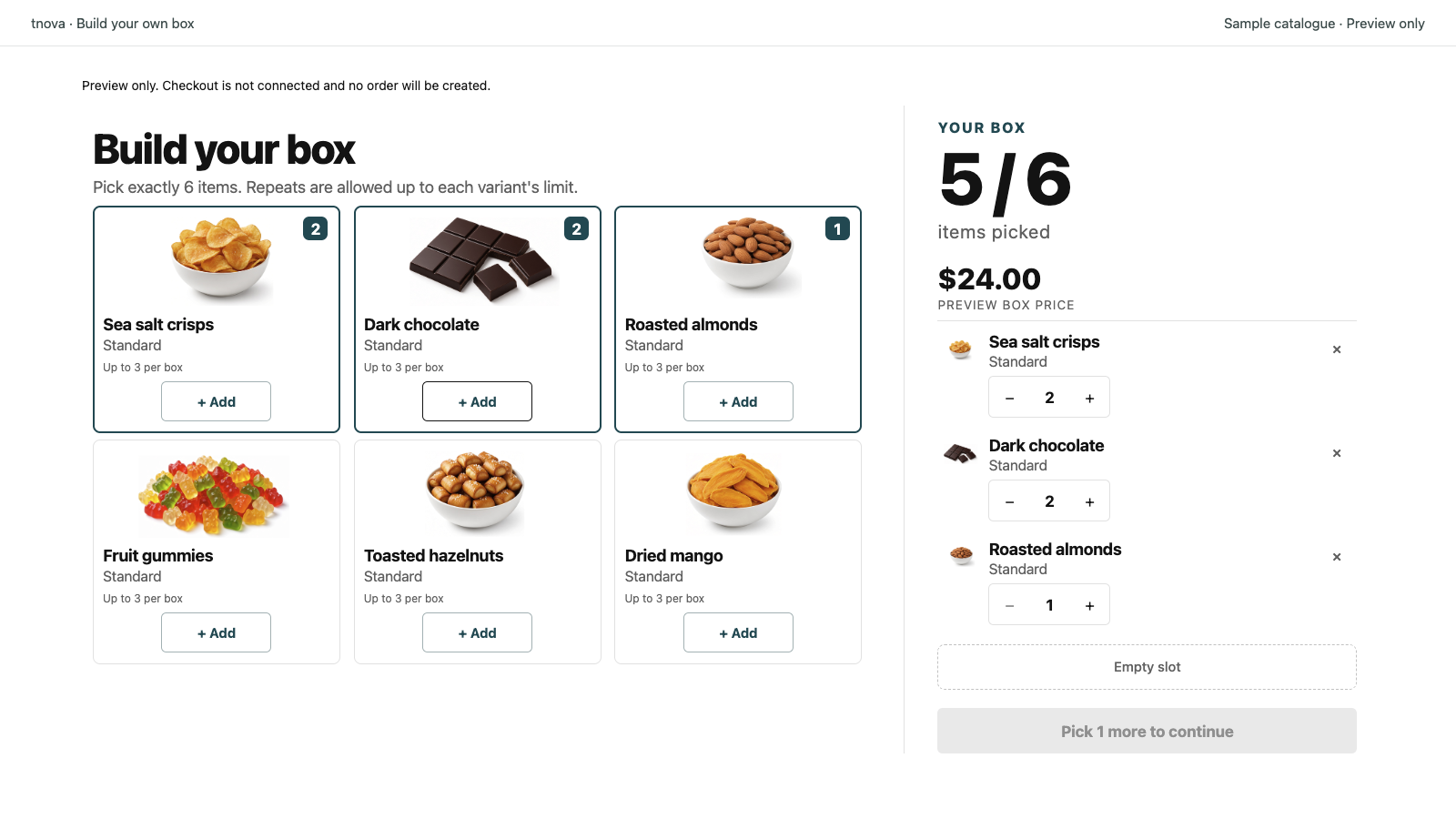
A build your own snack box works like any fixed-price mix-and-match gift box: you choose which snacks are eligible, how many items go in, and the single box price; shoppers fill the box within those rules. Success depends more on a coherent snack assortment and packable selections than on a long feature list. This guide covers assortment, counts, pricing, packing and product-page copy for a snack box Shopify offer—not food labeling, allergens or shelf-life rules.
tnova: Build Your Own Box is a Shopify app for fixed-price, shopper-picked gift and snack boxes. It is currently in Shopify App Store review, so public installation is not available yet. Online Store only; no POS.
Why a build your own snack box fits mix-and-match
Snacks are a natural fit for a custom snack box because shoppers already think in “picks”: sweet versus savory, bars versus bites, a drink or no drink. A locked starter kit cannot capture that preference. A shopper-picked box can—if you keep the candidate list coherent and the physical pack predictable.
Mix-and-match on Shopify means interchangeable products where the customer composes the set inside rules you define. That is the same shape as a build-your-own gift box, applied to pantry and specialty food SKUs. The merchant still owns the gift story: one box price, one required count, and a pool that still reads as “a snack box,” not “everything in the store.”
For the general BYOB model—rules, picker progress, cart checks—see build your own box on Shopify. The rest of this article focuses on snack-specific assortment and ops.
Building a snack candidate list
Curate first. Do not dump every edible SKU into the picker.
Keep a coherent mix
Aim for a pool that still feels like one snack story when every slot is different. A practical mix often includes:
- Sweet options (cookies, chocolate, fruit snacks)
- Savory options (chips, crackers, nuts)
- Optional drink or pantry extras that fit the same box size
Exclude items that break the story or the pack: oversized multipacks that never fit, glass that needs special handling you do not offer, or single SKUs so popular that every box becomes identical. Practical packaging and shipping fit matter here; this is not a legal or compliance checklist. Follow your own local rules for food sales separately.
Cap how often one SKU can appear
Per-variant limits stop one cheap or hyped snack from filling every slot. Without a limit, margin and variety collapse toward the same bar or bag. Set a limit that still lets fans pick a favorite once or twice, then forces the rest of the box into other candidates.
Assortment planning for gift boxes—theme, packaging size, stock buffer—transfers cleanly to snacks. A longer walkthrough is in how to curate a mix-and-match gift box assortment.
Plan component inventory
Shopify tracks inventory at the component level for bundled offers. For a snack box Shopify setup, plan stock against the combinations you allow, not only against a parent box title. Keep a buffer on bestsellers that appear in many allowed mixes. Shopify’s Help Center covers inventory and locations for how stock is managed across your store (as of 2026-10-28).
Item count and fixed price for snacks
Choose a required item count
Pick a count the packing bench can repeat every order. Too low and the box feels thin; too high and weight, volume and picker time climb. Many snack operators start with a mid-range count (for example in the 4–8 item-unit band) and test packing before they advertise the offer. Use your own packaging and SKU sizes—do not copy a count from another store.
Required count plus per-variant limits keep boxes comparable for packing and shipping. Setup detail is in how to set item counts and repeat limits for gift boxes.
Price one fixed box
Shoppers should see one box price before they open the picker, not a running sum of snack retail prices. That is a fixed-price custom snack box.
Work from your own unit costs. Identify the highest-cost mix the rules still allow, and set a box price that can absorb that mix after shipping and packaging. A step-by-step ceiling method is in how to calculate the highest allowed cost of a mix-and-match gift box. Do not invent average margins or conversion rates for this decision.
If you evaluate tnova: Build Your Own Box after installation opens, stated scope includes boxes of 2–12 item units, up to 100 candidate variants per box, default market and currency only, one shared online fulfillment location, and Online Store only (no POS). Pricing on the site is one plan at $19.90 USD per store per month with a 30-day trial when installation opens—no free plan. The price does not rise with box sales. Public installation is not available yet while the app is in review.
Packing and shipping practicalities
A snack BYOB fails in the warehouse before it fails on the product page. Treat weight and volume as operational constraints.
Test the worst-case mix
Build a few worst-case packs: all large bags, all dense bars, a drink plus bulky snacks. Confirm the physical box still closes, void fill still works, and the packed weight still fits the shipping rates you intend to use before you advertise the offer. A packaging walkthrough is in how to test packaging fit for a mix-and-match gift box.
Make the pick list usable on the bench
Each paid order should name the exact snack variants. Packers need component lines, not only a parent box title. Walk one full order from picker through packing slip before you put paid traffic on the offer. Ops detail is in how to pack Shopify mix-and-match gift-box orders.
Align fulfillment with real stock
Fulfillment and inventory must stay in sync when shoppers compose different mixes. Shopify’s Help Center outlines fulfillment for how orders move from sale to ship (as of 2026-10-28). Use that as the platform baseline; your snack box rules sit on top of it.
This section is about packability and shipping ops only. It does not cover food labeling, allergen disclosure, shelf life or health claims. Merchants should follow the rules that apply in their jurisdiction.
Product page copy for a snack BYOB
State the rules before shoppers start picking.
What to say on the page
- What the box is (build-your-own snack box at one fixed price)
- How many items belong in the box
- That choices come from your curated snack list
- Any per-variant limit shoppers will hit
- That the price is for the completed box, not a sum of snack tags
What to leave out
Do not invent “most popular” stats, fake reviews or conversion claims. Do not promise features you do not ship (gift messages, scheduled launches, POS). Do not turn the product page into a food-law FAQ; point shoppers to your store policies for allergens and ingredients if you publish those elsewhere.
Keep heading, short description and button labels aligned with the snack story so the picker and the product page say the same thing.
Pre-publish checklist for a snack box Shopify offer
| Check | Why it matters |
|---|---|
| Candidate snack pool | Coherent sweet/savory mix; packable; not the whole catalog |
| Per-variant limits | Stops one SKU from dominating every box |
| Required item count | Boxes stay comparable for packing and shipping |
| Fixed box price | Shoppers see one amount before they pick |
| Cost ceiling | Highest allowed mix still fits your price |
| Component stock buffer | Bestsellers can cover allowed combinations |
| Packaging fit | Worst-case mix still closes and ships |
| Packing slip path | Exact variants named on every order |
| Theme / cart test | Picker through add-to-cart on your live theme |
| Test order | One full order from picker to packed box |
Theme and cart behaviour varies. If you mention a cart drawer, verify it on that theme first. tnova’s cart drawer (Drawer mode) has been QA-verified on Dawn only—not on every theme.
FAQ
How many snacks should a box include?
Choose a required item count your packaging and packing bench can repeat every order. Many snack operators start in a mid-range band and adjust after a packing test. The right count is the one that still feels like a full snack box without breaking weight, volume or picker time—not a number copied from another store.
Can drinks and food share one box?
Yes, if both fit the same physical pack and shipping profile and you want them in the same gift story. Add drinks only when the worst-case mix (drink plus bulky snacks) still packs cleanly. If drinks need a different box size or shipping rate, keep them out of that candidate pool.
How do I stop one popular SKU from dominating every box?
Set a per-variant limit so a single snack can appear only a fixed number of times per box. Pair that with a curated pool that has real alternatives in the same price and size band. Without a limit, assortment and margin drift toward the one SKU everyone picks first.
Does this article cover food labeling or allergens?
No. This guide covers assortment, item counts, fixed pricing, packing and storefront copy for a build-your-own snack box. It does not cover food labeling, allergen rules, shelf life or health claims. Follow the requirements that apply in your jurisdiction; treat those as separate from picker and inventory setup.
Is tnova available to install for a snack box Shopify offer?
Not yet. tnova: Build Your Own Box is in Shopify App Store review. Public installation is not available, and this article does not include an install link. When installation opens, pricing on the site is one plan at $19.90 USD per store per month with a 30-day trial—no free plan. Scope is Online Store only.
See a gift box in action
Try the sample picker with fictional products. It creates no cart or order.
Try the box builder