
Their favorites.
One gift box.
Let shoppers choose what goes inside. Create fixed-price, mix-and-match gift boxes for your Shopify store, with the selection rules you set.
Preparing for Shopify App Store review. Public installation is not available yet.

You set the box. They make it theirs.
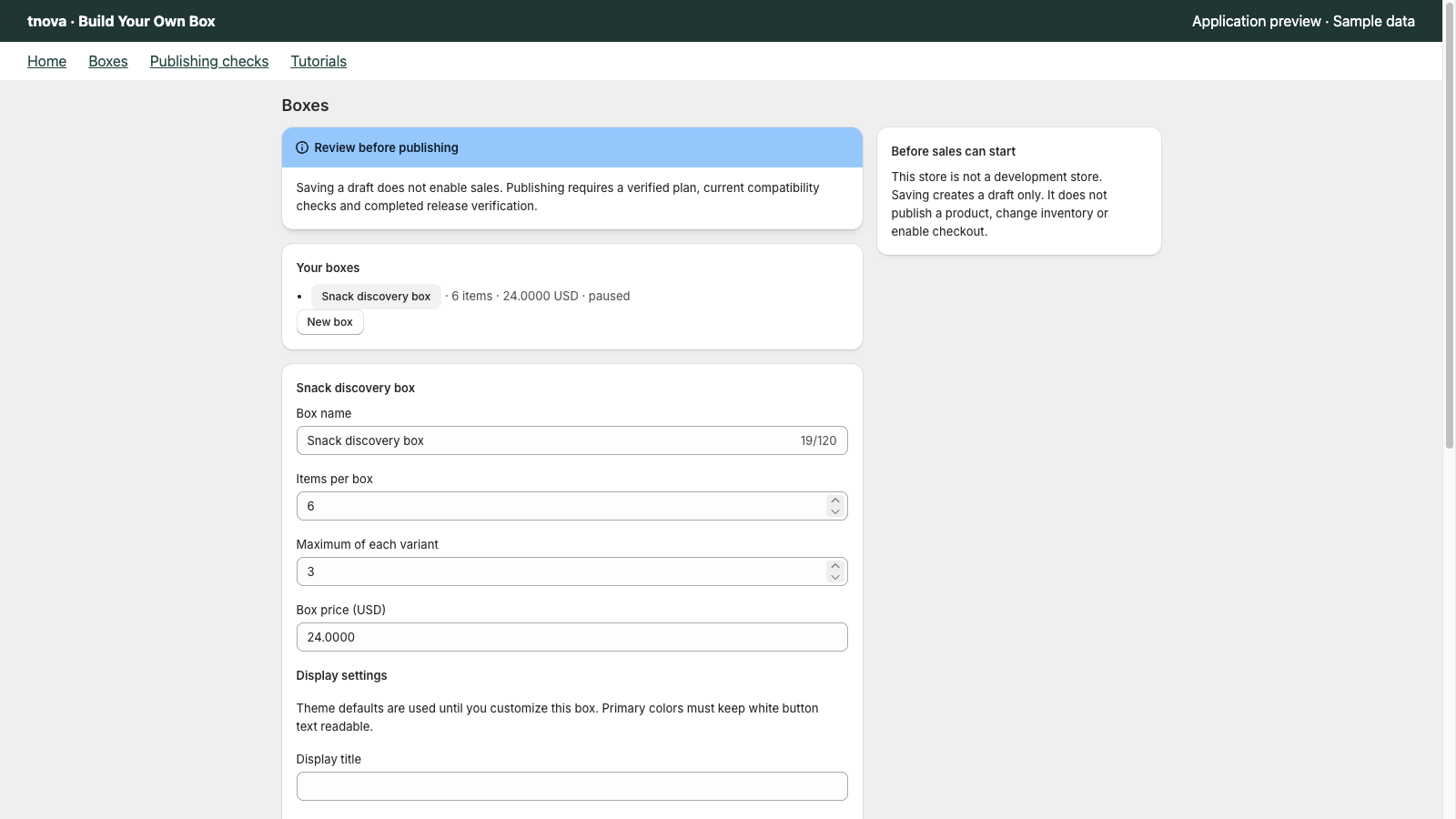
Choose the products, set one box price and decide how many items belong inside. Shoppers see what they have selected and what is still needed.
- A fixed price per box
- A clear item count
- Your selected products
Your products. Your rules.
Select the product variants to include. Set the required item count and a per-product limit, then keep your configuration as a draft while you prepare it.
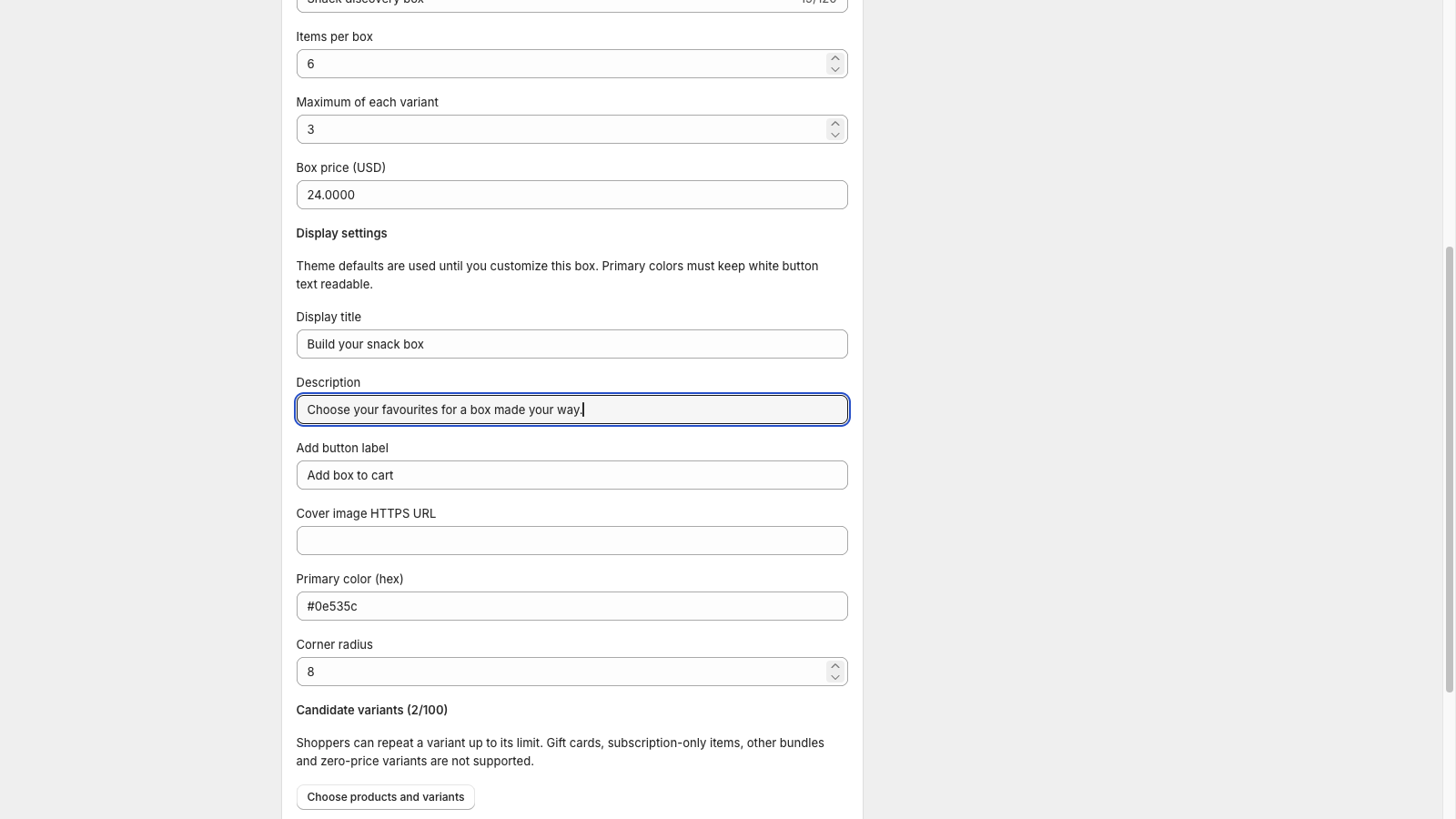
Make the picker feel at home.
Customize the title, description, button text and accent color. Add the picker as an app block in a supported Online Store theme.
More ways to build and manage your boxes.
Follow the current development-store test-purchase fixes, then explore the features being prepared: Sidekick assistance, bulk management, schedules, translations and Dawn 16’s cart drawer.
16 October 2026: the hosted app now includes first-open recovery, clearer plan status and setup links, and a test-box path for verified development stores that does not require a paid subscription. Agreement, owner confirmation and configuration checks still apply. A new full checkout for this updated path remains pending; earlier checkout evidence is retained below. Other additions await release.
Know what is ready before you publish.
Review publishing checks as you prepare a box. The app also brings box orders and their component details together for review.
Designed for the default market and currency, one fulfillment location for box components, and supported cart-page flows. Compatibility must be verified for your store before selling.
See the box take shape.
From the merchant’s settings to the shopper’s selection, follow the product in a three-minute walkthrough.
Actual app components with sample data. This preview does not show a completed live installation, billing approval or checkout.
Watch on YouTubeOne straightforward plan.
The configured plan will be available when the app opens for installation. No annual plan. Any subscription requires approval through Shopify.
Standard
30-day free trial$19.90USD / store / month
- Fixed-price, mix-and-match boxes
- Item counts and per-product limits
- Picker text and appearance settings
- Publishing checks and box-order review
Before you build your first box.
Can I install tnova today?
Public installation is not available yet. The app is being prepared for Shopify App Store review. You can explore the interactive example or contact us about your store in the meantime.
Does the interactive example place an order?
No. It uses fictional sample products to demonstrate selection, quantities and the box total. It does not connect to a real cart, payment or order.
What does my store need?
A Shopify Online Store theme with app blocks and a supported cart-page flow. The current scope uses the default market and currency, with box components supplied from one fulfillment location. Dawn 16’s cart page is the tested baseline; other themes and cart drawers need verification.
Can shoppers choose any number of products?
You set the required number of items in each box and the per-product limit. The picker shows selection progress so shoppers can build a complete box within those rules.
Which language is supported?
The merchant app interface is currently in English. Storefront picker translations and Shopify Translate & Adapt integration are being prepared for release; see Features and Updates for their scope and status. Chinese reference subtitles are available in the video player.
How do I contact support?
Email [email protected] with your store domain and a short description of what you want to do. Please do not send passwords, access tokens or unnecessary customer information.
About tnova
tnova: Build Your Own Box is an independent Shopify application for fixed-price, mix-and-match gift boxes. Merchants choose the available products, required item count and per-product limits.
The tnova team maintains this product and publishes the gift box guides on this website. For product questions, store compatibility or corrections to a guide, contact [email protected].
Our interactive example, screenshots and video use sample products. The guides explain planning choices; they do not report customer results. Public installation is not available while the app is being prepared for Shopify App Store review.
[email protected]Have a box in mind?
Tell us about your products and the experience you want to offer. We can help you understand the current fit for your store.