
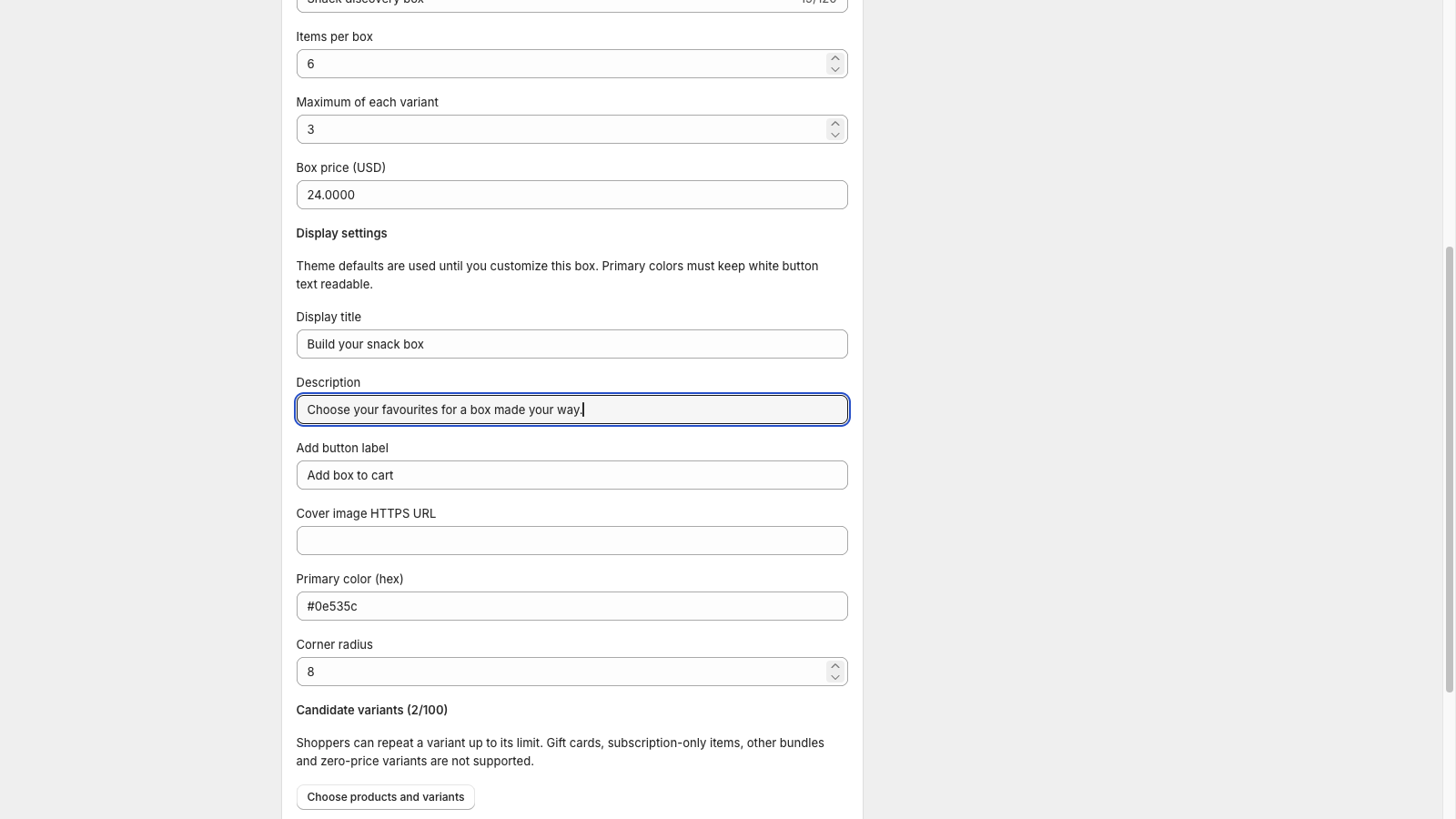
Quick answer: A mix-and-match gift-box description should tell shoppers what they choose, how many units complete the box, which repeats are allowed and what the displayed price includes. Put that promise near the picker, then use the rest of the page for verified product and delivery details. In tnova, the picker title, description and add-button label are editable display fields; the selection rules are configured separately.
This guide gives you a reusable writing template and a six-item example. It assumes you have already chosen the box rules. If you are still deciding the offer, start with how to plan a fixed-price gift box.
Make a short fact sheet before writing
Take the facts from the actual saved configuration and your store's offer:
- Required units per box and the maximum of each candidate variant.
- Candidate products, including the sizes or flavors shoppers can distinguish.
- Box price and currency.
- Packaging that is actually included, if any.
- Verified shipping terms and any separate charges.
- Relevant component details, such as materials, dimensions or ingredients, from your own product records.
Do not turn a fixed item count into “six different products” when repeats are allowed. Likewise, if the limit applies to a variant, avoid saying “two per product” when one product has several eligible variants. Explain the shopper-facing choice precisely. The selection-rule guide covers the mechanics; your copy should translate the configured rule into ordinary language.
Shopify's product description guidance recommends useful specifications and supported benefits. For a gift box, those details need to remain accurate across the allowed selections. If a material or ingredient applies to only one candidate, identify that candidate instead of presenting it as a property of every box.
Use a template that leaves no hidden promise
Replace every bracketed field with a verified fact before using this template on a product page:
Product title: Build Your Own [product type] Gift Box — [count] Items
Opening description: Choose [count] items from the selection below for [box price and currency]. You can choose up to [repeat limit] of each [clearly identified variant type]. Each box includes [verified packaging or included extras]. [Accurate statement about shipping and other charges.]
How to choose: Select the items you want until your box contains [count] units. Check your selection, then add the completed box to your cart.
Product details: [Link to, or provide, the relevant specifications for the selectable products. Explain any difference between candidates that matters to the purchase.]
Delivery information: [Your verified shipping terms and processing information, with a link to the store's policy where useful.]
Delete a sentence if you cannot substantiate it. For example, omit “gift-ready packaging” until you have confirmed the packaging included in the offer. Do not fill an unknown delivery date with a persuasive estimate.
See a worked six-item example
Suppose a fictional snack box allows six units, with at most two of each selectable snack variant. The box price is $36 USD. For this example only, assume shipping is calculated at checkout; packaging, ingredients and tax wording still need the merchant's own verified details.
Product title: Build Your Own Snack Gift Box — 6 Items
Opening description: Choose six snacks from the selection below for $36 USD per box. Choose up to two of each snack variant shown in the picker. Shipping is calculated at checkout.
How to choose: Pick six snacks in total, review your choices and add your completed box to the cart. Two of the same snack count as two items.
That last sentence answers a common ambiguity without repeating the full rule system. A selection of two berry, two oat, one cocoa and one nut snack has six units but four distinct variants. The description should make sense for that valid selection.
Avoid “any six snacks from our store” if only the variants in the picker are eligible. Avoid “save $10” unless you have a valid, current comparison for the actual offer. This example demonstrates wording, not a tested conversion improvement or a recommended price.
Put each sentence in the right field
Keep the longer product description and policy details on the Shopify product page. Use tnova's display settings for the short instructions beside the choices:
| Display field | Example text | Purpose |
|---|---|---|
| Display title | Build your six-item snack box | Identify the selection task |
| Description | Choose six snacks, with up to two of each variant shown below. | Explain the count and repeat rule |
| Add button label | Add box to cart | Describe the next action |
The button adds a completed selection to the cart in the supported selling flow. “Pay now” would describe a different action. Preview and demonstration states can use different completion messages, so inspect the actual state your shoppers will see.
tnova's picker description renders as plain text. Use a short sentence there; place links, detailed formatting and longer information in the product page content. Display text also does not change the item count, repeat limit, candidate pool or price. Update the configuration if the offer changes, then make the wording agree with it.
Answer only the questions your offer can support
These short answers can become product-page FAQs after you adapt them to your configuration:
Can I repeat an item? Yes, up to two of each snack variant shown in this example's picker. Each repeated unit counts toward the six-item total.
Can I choose a product that is not shown? This box uses the selection shown in its picker. Do not imply that the entire catalog is included.
Is delivery included? Use the shipping statement supported by your own store. A fixed merchandise price does not determine delivery charges. Work through the gift-box shipping checks before promising a rate.
Does choosing an item reserve it? Do not promise a stock reservation based on selection alone. Availability can change before checkout; use your actual storefront's current availability messages.
Describe gift messages or extra services only if your store implements them through a verified, compatible workflow. tnova's display-text fields do not add those features, and its current box workflow excludes subscription items.
Review the visible page and search preview together
Read the product page on mobile, beside the picker, and through the supported cart page. Check that the count, repeat wording, component names and price agree. Use the theme integration test plan when checking placement and the purchase path.
Write a descriptive search title and summary from the same real offer. For the fictional example, “Build Your Own Six-Item Snack Gift Box” is more informative than a string of unrelated gift keywords. Keep unsupported extras out of the search description as well as the page body.
Google's people-first content guidance supports descriptive titles, original value and accurate information. Its AI search guidance says ordinary SEO practices remain relevant and that special AI markup is not required. Clear copy helps shoppers understand the offer; it does not guarantee indexing or an AI citation.
About this guide: Prepared with AI assistance using tnova's documented display fields and current Shopify and Google guidance, checked October 8, 2026. The snack box, price and sample wording are illustrative, not a live merchant offer or customer result.
See a gift box in action
Try the sample picker with fictional products. It creates no cart or order.
Try the box builder